Analytics Infrastructure · Design Operations · Process Optimization

Building the Event Tracking Dictionary
From 180 Days to 30 Days — Standardizing Mixpanel Implementation

As a Product Designer focused on operational efficiency, I created a comprehensive event tracking dictionary that standardized Mixpanel implementation across the organization. By documenting every event, property, and funnel mapping upfront, I reduced implementation time from 180+ days to 30–40 days—an 83% reduction. This simple framework transformed how our product and engineering teams collaborate on analytics infrastructure.

The Problem: Slow & Inconsistent Implementation

Integrating Mixpanel into a new product took 180+ days—six months or more. This wasn't because of technical complexity. It was because of process inefficiency. Product teams would build something, then ask analytics to instrument it. Analytics would ask "what events do you want to track?" Engineers would say "I'm not sure, let me check with product." Product would say "what can you measure?" This back-and-forth created delays, rework, and inconsistent event naming across products.

Even after implementation, we'd realize events were incomplete or properties were missing. Data quality suffered because there was no single source of truth for what should be tracked.

"180 days to implement Mixpanel isn't a technical limitation—it's a communication problem. Without a shared language, teams kept going in circles."

The inefficiency wasn't intentional. It was the result of teams not having a framework to align on analytics requirements before building. We needed to reverse the process: define what to track first, then build it.
Understanding the Bottleneck

What I Did: I analyzed past Mixpanel implementations across products and interviewed product managers, engineers, and analytics stakeholders to understand where time was being lost.

What I Found: The core issue was lack of specification. Product teams built features without a clear analytics requirement document. Engineers instrumented code without knowing the full event structure. Analytics teams couldn't validate if tracking was correct because there was no "correct" to compare against. This created a spiral of back-and-forth refinements.

Teams were solving the same problems repeatedly. Each product created its own event naming conventions. Each team had different ideas about what properties should be tracked. There was zero standardization, zero efficiency, zero speed.

The insight was clear: we needed a single, shared template that answered every question upfront:

• What feature are we tracking?
• What events occur in this feature?
• What properties should each event capture?
• How do these events map to user funnels?
• What's the deployment status?
• What interaction type is this (screen or endpoint)?
• What's the expected response/action?

The Event Tracking Dictionary

I created a standardized spreadsheet template that became the single source of truth for all Mixpanel implementations. Every product team uses the same template, asks the same questions, and delivers the same level of clarity to the engineering team.

1
Unified Event Specification
Every event is documented in the same format with consistent naming conventions, properties, and descriptions. No more ambiguity about what to track.
2
Pre-Alignment with Engineering
Engineers review the dictionary before building. They know exactly what events to create, what properties to capture, and how to structure the data.
3
Centralized Funnel Mapping
All user journeys and funnels are documented alongside events. Analytics can immediately validate that implementation matches the intended funnel.
4
Deployment Tracking
Status column shows development, staging, or production. Teams know what's live, what's in progress, and what's blocked.

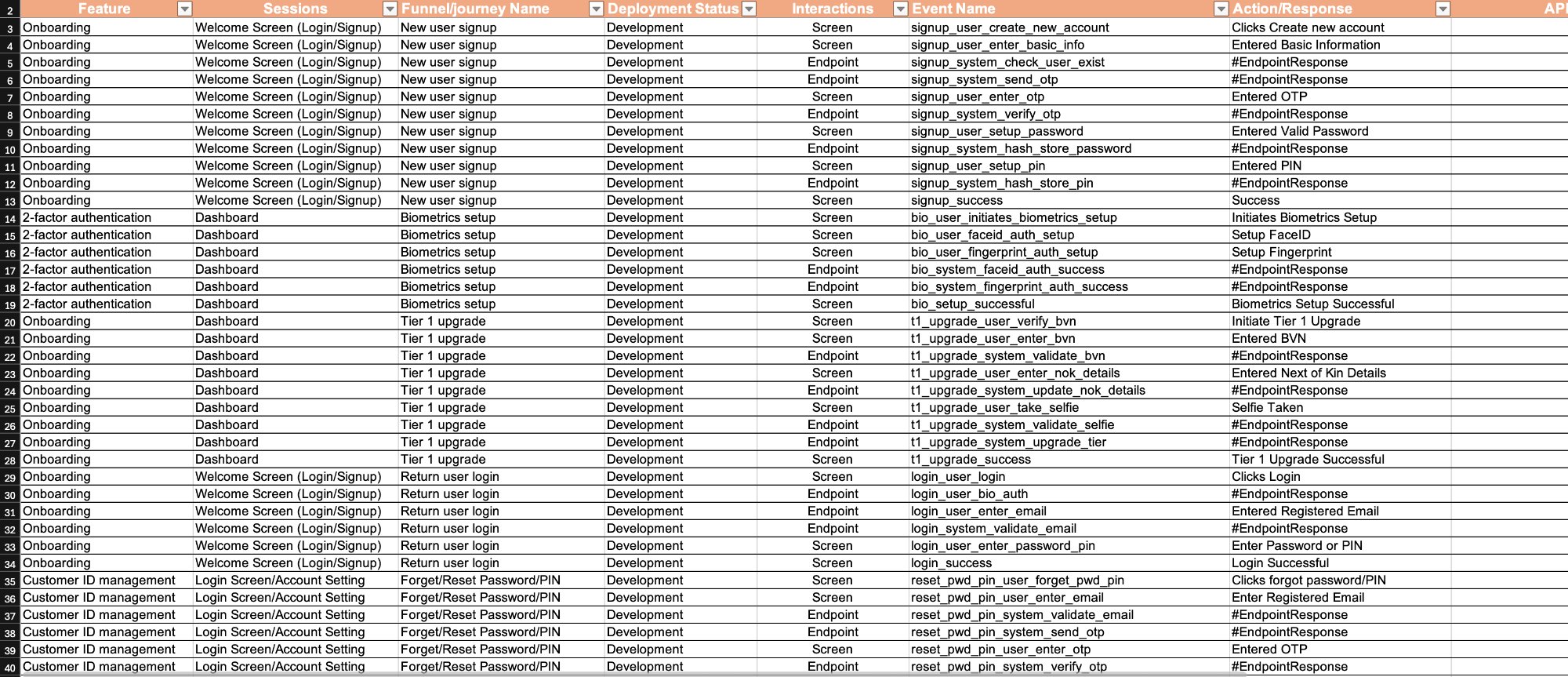
The template includes columns for Feature, Sessions, Funnel/Journey Name, Deployment Status, Interactions, Event Name, and Action/Response. This simple structure eliminated months of back-and-forth by answering every question upfront.

The Results

83%
Time Reduction (180 → 30 days)
6x
Faster Implementation Speed
100%
Standardization Across Products

The impact was immediate and dramatic. Mixpanel implementation time dropped from 180+ days to 30–40 days—an 83% reduction. More importantly, the quality of implementation improved. Events were consistent across products. Properties were complete. Funnels were accurately tracked from day one.

What changed wasn't just speed—it was clarity. Engineers got a document that answered every question. Product teams had a framework for thinking about analytics before building. Analytics teams could validate implementations faster because they had a spec to check against.

The dictionary became so valuable that it evolved beyond Mixpanel. Product teams started using it as their core feature specification. It became the lingua franca between product, design, engineering, and analytics.

The Dictionary in Action. Below is the actual event tracking template that standardized implementation across all products. Notice the structure: Feature → Sessions → Funnel/Journey → Deployment Status → Interactions → Event Name → Action/Response. Every product team uses this same format.

Event Tracking Dictionary: Comprehensive spreadsheet showing onboarding, 2-factor authentication, tier 1 upgrade flows with event names, properties, deployment status, and expected responses

What This Template Shows: Rows represent individual trackable events. Columns represent the complete specification. For example, in the Onboarding section, we see:

Feature: Onboarding (Welcome Screen Login/Signup)
Sessions: Lists the user journey stages (welcome, OTP, password setup, PIN setup)
Funnel/Journey Name: "New user signup" — tells us this is part of the acquisition funnel
Deployment Status: "Development" — tells engineers this is still being built
Interactions: "Screen" or "Endpoint" — tells engineers where the event fires
Event Name: "signup_user_create_new_account" — the exact event to instrument
Action/Response: "Clicks Create new account" — the user action that triggers it

The Result: Instead of product saying "track user signup" and engineers asking "what does that mean?", the dictionary says "create this exact event with these exact properties when users click this exact button." No ambiguity. No rework. Just implementation.

The dictionary transformed from a specification document into the core product definition. Every feature now has a complete analytics blueprint before a single line of code is written.

Key Learnings

1. Process Inefficiency Looks Like Technical Debt
Teams assumed 180 days was a technical limitation of Mixpanel. It wasn't. It was process. A single spreadsheet template reduced that to 30 days. Sometimes the solution isn't better tools—it's better processes.
2. Specification First, Build Second
The dictionary enforced specification discipline. Define events upfront, get stakeholder alignment, then build. This prevented rework and ensured quality from day one. Spec clarity beats build speed.
3. Standardization Unlocks Scale
Before the dictionary, each product had different event names, different properties, different structures. This made analysis impossible. Standardization on a single template meant analytics became consistent across the entire platform.
4. Templates Are Design Systems for Operations
The dictionary is just a spreadsheet. But it's a design system for how we think about analytics. It standardizes terminology, reduces decisions, and accelerates execution. Templates are underrated operational tools.
5. 83% Efficiency Gain Compounds Across Products
Saving 150 days per product launch matters. When you're launching 5, 10, 20 products, that's 750, 1500, 3000 days saved annually. Small efficiency gains in repeated processes create massive organizational value.